
Linear Actuator 12V Wiring Diagram for 2‑Wire & Pigtail‑Cable Actuators
Many DIY builders and prototype engineers search for a Linear Actuator 12V Wiring Diagram when they first receive a 12V DC linear actuator. A complete driver‑control box is not always required for simple proof‑of‑concept testing. You can run a 12V electric push‑rod with basic switches, our wired hand controller or relay modules for small‑scale prototype work, and this Linear Actuator 12V Wiring Diagram walks you through every critical step.
Important note: Our standard FD‑series linear actuators are 2‑wire units by default. We do not offer regular 4‑wire Hall‑sensor actuators as standard stock. For special custom orders, 3‑branch pigtail cable actuators are available for direct wired‑hand‑controller connection, and this Linear Actuator 12V Wiring Diagram covers both stock and custom cable variants.
There are two distinct scenarios: simple manual‑switch‑driven or wired‑hand‑controller prototype testing, and commercial‑grade equipment that uses dedicated driver hardware. If you are building finished devices that require RF wireless remote control or mixed wired‑and‑wireless operation, please read our full linear actuator driver matching & wiring guide.
This guide built around the Linear Actuator 12V Wiring Diagram covers practical wiring knowledge for 2‑wire and custom 3‑pigtail‑cable 12V linear actuators, including DPDT switch connection, wired hand‑controller usage, RF wireless remote solution, power‑supply rules, fuse selection and typical wiring errors. All examples apply to our FD‑series electric linear actuators.
What You Need Before Following This Linear Actuator 12V Wiring Diagram
Gather these components before you start wiring following this Linear Actuator 12V Wiring Diagram for your 12‑volt linear‑actuator prototype:
- 12V DC linear actuator
- 12V DC power supply with output current higher than the actuator’s full‑load current rating
- Option A: DPDT switch for manual forward/reverse control
- Option B: Our original wired hand‑controller (works with custom 3‑pigtail‑cable actuator version)
- Option C: Sanxing 12V controller kit, if you need RF wireless remote or mixed wired + wireless control
- Suitable AWG‑rated copper wiring cables
- Fuse (critical safety component, do not skip)
- Wire crimps or terminal blocks for secure connections
Note: This Linear Actuator 12V Wiring Diagram article describes simple wiring for lab‑style prototypes. For mass‑produced commercial equipment, we strongly recommend using purpose‑built driver‑control hardware. Refer to our dedicated linear actuator driver matching & wiring guide for commercial‑level solutions。
Difference Between 2‑Wire and Custom Pigtail‑Cable Linear Actuator
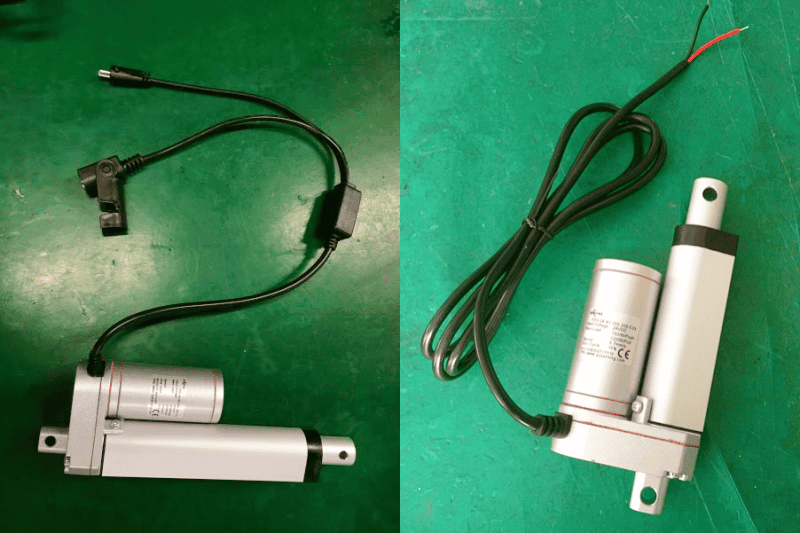
The above product is Sanxing FD5 Electric Mini Linear Actuator.
Our standard production linear actuators are 2‑wire design. Custom‑order 3‑branch pigtail‑cable versions are available for direct wired‑hand‑controller connection. We do not supply standard‑stock 4‑wire Hall‑sensor actuators. Before you begin with any Linear Actuator 12V Wiring Diagram, confirm your actuator cable configuration.
2‑Wire Linear Actuator (Standard Version)
A standard 2‑wire linear‑actuator only contains two main motor power wires. Reversing positive and negative power polarity will swap extend and retract movement. Built‑in mechanical limit switches automatically cut power once maximum or minimum stroke is reached.
- Advantages: Simple wiring, low cost, widely used in general lifting applications.
- Disadvantages: If you don’t have control switch to control the actuator operate, you need to switch the wires to the power by hand, it’s not convenient.
- Usage note: Standard 2‑wire actuator cannot plug‑and‑play with our wired hand‑controller directly. If you want direct hand‑controller operation without extra switch wiring, please order the custom 3‑pigtail‑cable variant shown in our Linear Actuator 12V Wiring Diagram.
Custom 3‑Pigtail‑Cable Linear Actuator
On special customer request, we produce 3‑branch pigtail‑cable actuators: two wires for motor power, one dedicated connector branch for plugging into our wired hand‑controller.
- Advantages: Plug‑and‑play with Sanxing wired hand‑controller, no complex polarity‑swap wiring required.
- Important: This is a custom‑order option, not our default stock configuration. Standard 2‑wire actuators cannot use this direct plug‑in function.
If you require RF wireless remote control or simultaneous wired‑hand‑controller + wireless remote operation, you will need our complete Sanxing 12V controller unit. See our linear actuator driver matching & wiring guide.
2‑Wire Actuator DPDT Switch Wiring Diagram (Core section of our Linear Actuator 12V Wiring Diagram)
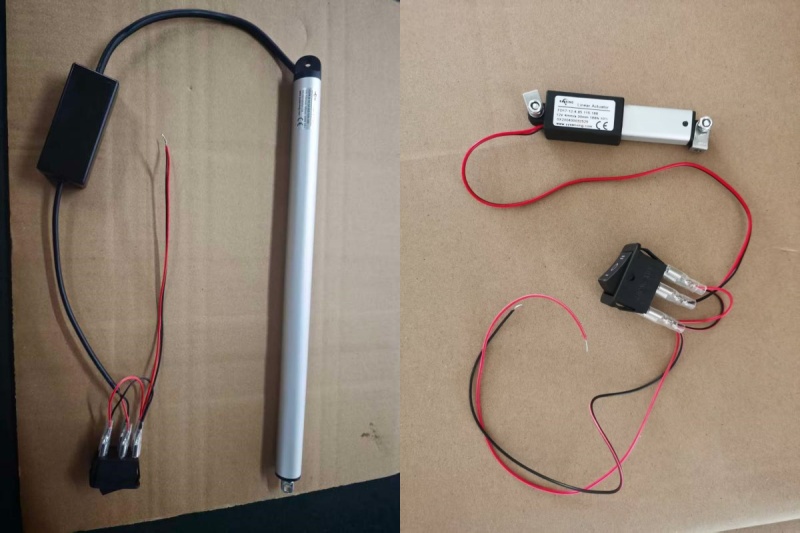
The above actuators are Sanxing FD16 Compact IP68 Linear Actuator ( the left ) and FD17 Micro 188N Linear Actuator ( the right ).
Most hobby‑style and prototype users look for a Linear Actuator 12V Wiring Diagram to implement manual forward‑reverse control using a DPDT switch. This setup works for our standard 2‑wire stock actuators.
A DPDT switch works by swapping positive‑negative polarity supplied to the two motor wires, which toggles extend / retract motion.
Basic wiring logic you will follow from this Linear Actuator 12V Wiring Diagram:
- Connect your 12V DC power‑supply positive and negative output to the DPDT switch power input terminals.
- Connect the DPDT switch output terminals to the two motor wires of your 2‑wire linear actuator.
- Install a fuse in the positive power line between power‑supply and switch input for short‑circuit protection.
Important safety reminders:
- Even though the actuator has built‑in end‑of‑stroke limit switches, avoid holding continuous power after it hits full stroke. Sustained stall condition will overheat the internal motor and shorten service life.
- Always fit a matching‑rating fuse. Without a fuse, short‑circuits can damage your power‑supply and actuator, and create fire hazards.
- If the actuator moves backwards after finishing wiring according to this Linear Actuator 12V Wiring Diagram, simply swap the two motor wires connected to DPDT output terminals.
Wired Hand‑Controller & RF Wireless Remote Operation Options
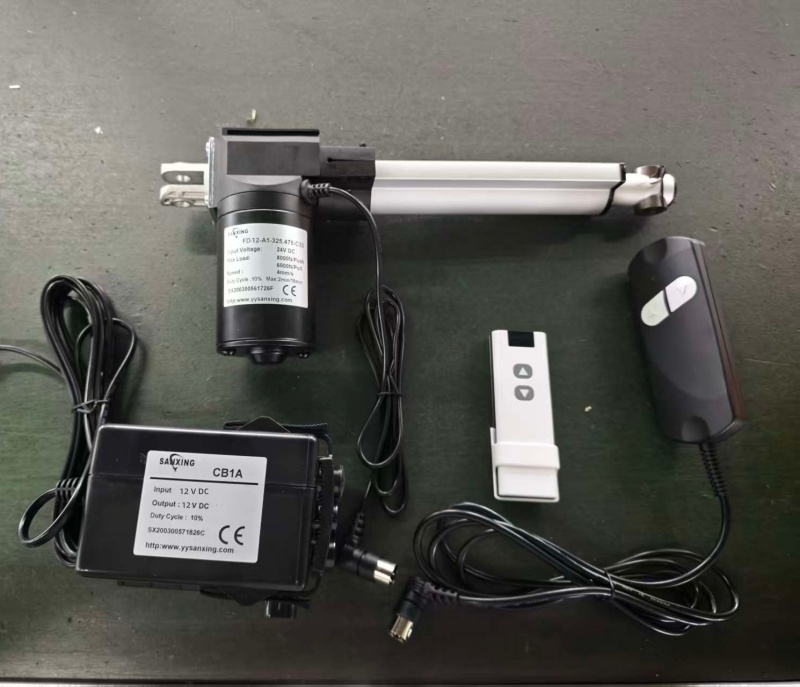
The above actuator is our Sanxing FD1 heavy duty Linear Actuator.
Option1: Use wired hand‑controller
Only available for the custom‑order 3‑pigtail‑cable actuator: Plug our wired hand‑controller directly into the dedicated third branch connector on the pigtail cable. Connect actuator power wires to 12V DC power supply with fuse. You can control extend / retract directly via hand‑controller buttons, no DPDT switch needed.
Standard stock 2‑wire actuator cannot directly connect to the wired hand‑controller. You either use DPDT switch following this Linear Actuator 12V Wiring Diagram, or order 3‑pigtail‑cable custom version, or pair with our Sanxing 12V controller unit.
Option2: RF wireless remote control (or wired + remote mixed use)
Our RF‑type wireless remote cannot drive the actuator directly. It must work together with our Sanxing 12V controller unit, because the controller contains the built‑in RF signal receiving module.
Setup steps:
- Connect Sanxing 12V controller’s power input terminals directly to your 12V DC power supply with fuse.
- Connect your 2‑wire linear‑actuator motor wires to the controller’s actuator output terminals.
- Pair your RF remote with the controller following the product manual.
- If you want wired hand‑controller and RF wireless remote to work at the same time, this is also supported — simply plug our wired hand‑controller into the corresponding port of the Sanxing 12V controller unit.
For full hardware‑selection and matching instructions, read: linear actuator driver matching & wiring guide.
Relay‑Based 12V Wiring Setup
Use dual‑relay wiring when you want to control your 12V actuator via MCU or PLC signal instead of manual physical switches. This relay setup is an alternative option outside of the DPDT portion in our Linear Actuator 12V Wiring Diagram.
Key points:
- Dual relays handle polarity switching to realize extend and retract functions.
- The relay output side must strictly supply 12V DC. Never feed AC voltage into DC actuator terminals.
- This configuration fits laboratory prototype automation tests. For mass‑production industrial equipment, choose our Sanxing 12V controller‑control units. See our linear actuator driver matching & wiring guide for commercial‑grade hardware options.
Power Supply, Fuse & Wire Gauge Requirements
Many wiring failures trace back to improper power supplies, wrong fuse ratings or undersized wiring cables, even if you strictly follow a Linear Actuator 12V Wiring Diagram.
Power Supply Selection
- Stick strictly to 12V DC input. Over‑voltage will speed up the motor excessively and cause overheating and premature wear.
- Power‑supply continuous output current must exceed the actuator full‑load operating current. For example, FD17 draws 2.1A under full load, so choose a power‑supply rated for ≥3A continuous output.
Fuse Size Selection
Select fuse rating slightly higher than actuator full‑load current:
- Actuator full‑load current below 2A: use 3A fuse
- Actuator full‑load current between 2‑4A: use 5A fuse
The fuse cuts power instantly in short‑circuit events, protecting wiring, power‑supply and actuator hardware. Never skip fuse installation, even when you follow a Linear Actuator 12V Wiring Diagram.
AWG Wire Gauge
Cable length directly influences voltage drop. Too‑thin cables cause thrust loss and heat generation:
- Short wiring distance (< 1 m): 18‑20 AWG
- Medium‑long wiring distance (1‑3 m): 14‑16 AWG
Most Common 12V Wiring Mistakes & Troubleshooting
- Reversed power polarity: Actuator runs in opposite direction. Solution: swap the two motor‑side wires. This mistake normally does not destroy hardware, and it frequently happens when users are new to a Linear Actuator 12V Wiring Diagram.
- No fuse fitted: Short‑circuit risks exist. Always install a correctly‑rated fuse on positive power path.
- Wire gauge too thin or cable overly long: Creates large voltage drop; reduced thrust and abnormal heating. Upgrade to thicker AWG cable.
- Trying to plug wired hand‑controller into standard 2‑wire actuator: Will not function. Use DPDT switch as shown in our Linear Actuator 12V Wiring Diagram, order custom 3‑pigtail‑cable actuator or adopt Sanxing 12V controller unit.
- Continuous power applied after hitting stroke limit: Triggers long‑time motor stall, leads to over‑heating and component fatigue. Release control input once end‑position is reached.
- Trying to drive actuator directly with RF remote without Sanxing controller: Our RF remote has no power‑output capability. It must pair with Sanxing 12V controller with built‑in RF receiving module.
- AC voltage fed into DC circuit: Causes permanent destruction of the linear actuator. Ensure your power source outputs pure 12 V DC.
When You Should Use a Complete Actuator Driver / Control Box
Simple DPDT‑switch and relay‑based wiring work fine for short‑term lab prototypes when you reference our Linear Actuator 12V Wiring Diagram. For these real‑world use‑cases you should adopt our complete Sanxing 12V actuator‑controller hardware:
- You need our original RF wireless‑remote control
- Need both wired hand‑controller AND wireless remote to work simultaneously
- Multi‑actuator synchronous lifting / positioning
- PLC industrial‑system integration
- Built‑in comprehensive overload protection
- Mass‑produced finished commercial devices
For full hardware‑selection and matching instructions, read: linear actuator driver matching & wiring guide.
FAQ
Q1: Can I run a 12V linear actuator directly with just a battery, no driver board?
A: Yes for simple prototype testing with our standard 2‑wire actuator. You still have to add a fuse for safety, as highlighted in this Linear Actuator 12V Wiring Diagram. For commercial mass‑production projects, dedicated driver‑control units are strongly recommended.
Q2: My 12V linear actuator runs backwards after wiring, how to fix it?
A: Swap the two motor‑power wires connected to your switch or relay output terminals, as described in our Linear Actuator 12V Wiring Diagram.
Q3: What size fuse should I use for my 12V linear actuator?
A: Choose a fuse rating slightly higher than the actuator full‑load current. For example, FD17 drawing 2.1A full‑load uses a 3A‑5A fuse. Never omit the fuse.
Q4: Can I plug your wired hand‑controller directly to your standard 2‑wire actuator?
A: No. Direct plug‑and‑play hand‑controller function is only available for custom‑ordered 3‑pigtail‑cable actuators. For stock 2‑wire units: use DPDT switch following our Linear Actuator 12V Wiring Diagram, or pair with Sanxing 12V controller unit to support wired hand‑controller.
Q5: Can I use your RF wireless remote without buying your controller?
A: No. Our RF remote is only a signal transmitter. The Sanxing 12V controller contains the necessary RF receiving module. Remote must work together with our matching controller unit.
Q6: Is it possible to use wired hand‑controller and RF wireless remote for one actuator at the same time?
A: Yes. You need our Sanxing 12V controller unit. Connect actuator to controller, plug‑in wired hand‑controller, and pair your RF remote to the controller. Both control modes will work.
Q7: Why my 12V actuator has lower‑than‑expected thrust?
A: This issue most often comes from insufficient power‑supply output‑current or excessive voltage drop caused by too‑thin or over‑long cables. Double‑check your power‑supply rating and AWG wire gauge shown in this Linear Actuator 12V Wiring Diagram.
Q8: Will hitting built‑in limit switch damage my 12V linear actuator?
A: The built‑in mechanical limit switch cuts motor power when stroke ends. However, do not keep applying power continuously after triggering the limit switch; long‑term stall will cause internal components to overheat.
Conclusion
Simple 12‑volt wiring using switches and relays is completely workable for prototype and proof‑of‑concept builds using this Linear Actuator 12V Wiring Diagram. Most of our FD‑series actuators are standard 2‑wire type; custom‑order 3‑pigtail‑cable variant supports direct wired‑hand‑controller connection. Our RF wireless remote cannot drive actuator standalone and requires matching Sanxing 12V controller hardware.
Keep in mind the clear boundary: basic switch‑relay setups serve prototypes, while finished commercial products require purpose‑built driver‑control hardware. Visit our linear actuator driver matching & wiring guide for commercial‑grade solutions.
If you need custom stroke, custom voltage or custom 3‑pigtail‑cable linear actuators for your equipment project, feel free to send your detailed technical requirements via our contact page. Our engineering‑sales team will provide you with targeted product recommendations within 24 working hours.